pixelraiderCan you show the setup after this match?
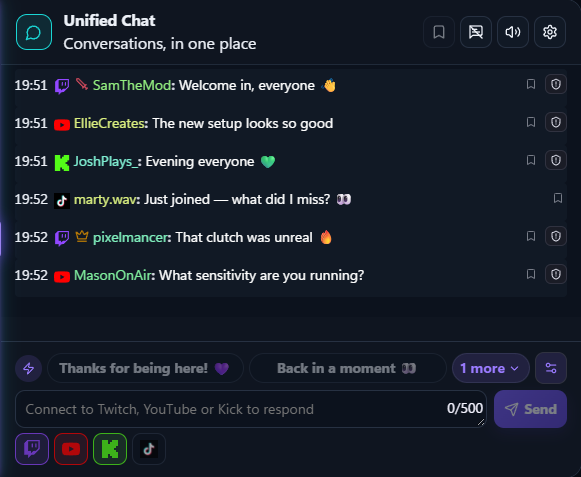
Multistream chat for Twitch, YouTube and Kick
FeedNChat, the multistream
creator control room
Unify Twitch, YouTube and Kick chat, monitor TikTok LIVE read-only, and keep activity, priorities and HUD cues in one Windows control room.
Windows 10/11Β·Free foreverΒ·No credit card required

Interactive demo Β· Simulated data
Try a live in 3 clicks
Every community, one conversation.
Download FeedNChat for WindowsMaya CreatesThis explanation deserves a clip.
nightshiftQuestion pinned for the next segment.
luna.liveWe just arrived from the other stream π
Unified chat1 conversation
pixelraiderCan you show the setup after this match?
Maya CreatesThis explanation deserves a clip.
nightshiftQuestion pinned for the next segment.
luna.liveWe just arrived from the other stream π
Beyond unified chat
Four surfaces. One live context.
FeedNChat does more than collect messages: it turns what happens before, during and after a broadcast into tools the creator and their team can actually use.
Simulated data examples- Grid / Free
- 4 modules
- Opacity 45%
An overlay and HUD shaped around you
Compose modules in Grid or Free mode and adjust size, position, alignment, colours and opacity without destabilising the control room.
- +96 followers
- 34 msg/min
- Peak 842
Understand the community behind the numbers
Follow growth, participation, peaks and returning people to learn what keeps viewers engaged and brings them back.
- β¬84 support
- 1.2K Bits
- 18 gifts Β· peak +18%
Support and performance kept meaningful
Donations, Bits, gifts and native platform units stay separate; viewer peaks and live performance complete the picture.
- 2 online
- Focus Inbox
- Scoped access
Moderators in the control room, with the right limits
Invite your team, grant focused permissions and share Focus Inbox, markers and allowed actions without giving away full control.
Inside the control room
Six systems. One live.
From the first message to the post-live report, every surface works from the same operational context.
Unified chat
Twitch, YouTube, TikTok and Kick flow into one readable feed without switching windows.
Focus Inbox
Questions, mentions and priority messages rise above the noise when a reply matters.
HUD and Alert Studio
Configurable chat, activity and alerts stay visible while you play without stealing focus.
Automations and quick actions
Commands, timers and operational controls keep repetitive work out of the live.
Viewer Pulse
Observed platform counts stay separate, transparent and readable at a glance.
Team, history and reports
Scoped roles, session moments and exportable reports carry the work beyond the broadcast.
The product, not a promise
Your live stays whole, even when your audience is everywhere.
FeedNChat organizes what happens around the broadcast. Your streaming software keeps sending the video; FeedNChat connects conversations, signals, operational actions and what you do next.

Less context switching
Follow multiple communities without constantly jumping between panels and windows.
The right signal at the right time
Focus Inbox, alerts, goals and markers separate what matters from the noise.
The live continues after sign-off
With Pro, history and reports deepen every session; clips and the calendar help turn it into the next piece of content.
Before, during, after
One continuous workflow, not another dashboard.
Prepare the control room, run the live moment and keep all its context when the broadcast ends.
The same context travels through the whole session
- Permissions verified
- Alerts ready
- HUD loaded
Go live already prepared.
Connect channels, choose a workspace profile and use Preflight to catch missing permissions, alerts or links.
- Setup Center
- Live Preflight
- Workspace profiles
Priority question detected00:18
Community activity spike00:31
Moderators online2
HUD activeON
Run the stream from one place.
Read and moderate chat, follow activity and priorities, trigger quick actions and keep a lightweight HUD above your work.
- Control Room
- Focus Inbox
- HUD & Action Deck
Peak viewers842
Clip markers03
Direct supportβ¬84
Keep what worked.
With Pro, review the session and its performance; then prepare clips and content and retain proof and outcomes from partnerships.
- Reports & metrics (Pro)
- Clip Workspace
- Sponsor Workspace
A control room that grows with your format
Your operational tools stay connected.
Use only what you need today. When your format becomes more complex, the live context is already in the same system.
Chat, activity and moderation
Multichannel flow, search, filters, priority messages and moderation actions where supported.
Overlay, alerts and Feed FX
Keep chat, goals, cues and alerts in view with configurable desktop controls.
Automation and interaction
Commands, timers, polls, giveaways, loyalty, viewer queues and Action Deck work with the session.
Companion and shared control rooms
Bring KPIs and allowed actions to your phone and give collaborators only the permissions they need.
Analytics and reports (Pro), clips and calendar
Find peaks, markers and insights, then turn them into trackable drafts and editorial work.
Sponsor workflows
Organize briefs, disclosures, cues, proof, declared conversions and reviews without mixing sources.
Works with the setup you already have
FeedNChat coordinates the live. It does not replace your studio.
Keep broadcasting with the software and accounts you prefer. FeedNChat owns the operational layer around the video.
- No video encoding or restreaming
- Official APIs where available and public TikTok LIVE monitoring
- Desktop, HUD and Companion in one workflow
The video stays in your streaming software.
Transparent compatibility
Always know what is truly connected.
FeedNChat uses official APIs where available and monitors public TikTok LIVE streams without asking for passwords, cookies or tokens. Available actions remain platform-specific.
Chat, events and creator tools
OAuth, messages, EventSub, moderation and actions supported by the Twitch API.
Live Chat and multichannel operations
Live discovery, messages, chat and supported moderation workflows.
Official chat and events
OAuth, signed webhooks and capabilities available through the official integration.
Read-only LIVE chat and interactions
Enter the public channel: FeedNChat waits for the LIVE, captures chat, gifts, likes, follows and shares, then keeps them in history.
TikTok is read-only: sending messages is unavailable and monitoring depends on the public TikTok LIVE stream.
Resources
Explore FeedNChat
Follow the part of the workflow that matters most to your next live session.
Multistream chat for Twitch, YouTube, Kick and TikTok LIVE
Bring Twitch, YouTube and Kick chat into one Windows app and monitor public TikTok LIVE in read-only mode. Search messages, pin priorities and keep sources visible.
Read the guide: Multistream chat app for creatorsA calmer place to run the moving parts around your live.
Run chat, activity, goals, cues and live actions from one streamer control room built for Twitch, YouTube, Kick and TikTok workflows.
Read the guide: Streamer control roomKeep live context in view without rebuilding your studio.
Keep chat, alerts, goals and cues visible with a configurable FeedNChat desktop HUD designed to support a live workflow without replacing your studio.
Read the guide: Desktop HUD and overlayBring public TikTok LIVE activity into the same creator workflow.
Monitor public TikTok LIVE chat and interactions in FeedNChat. Read-only workflow for chat, gifts, likes, follows and shares with clear limits.
Read the guide: TikTok LIVE monitoringTreat the live as a complete workflow, not a single button.
Plan and run multistream sessions, then use Pro reports alongside clips and sponsor follow-up in one creator workflow.
Read the guide: Creator workflowA control room built to make live operations more understandable.
Learn what FeedNChat is, why it exists and how it approaches multistream chat, creator privacy, platform limits and product transparency.
Read the guide: About FeedNChatHow to combine Twitch, YouTube and Kick chat in one app
Learn how to combine Twitch, YouTube and Kick chat in one Windows app, keep every platform label visible and monitor public TikTok LIVE read-only.
Read the guide: Combine stream chatsA multistream chat app built for Windows creators
Use a dedicated Windows 10 or 11 multistream chat app for Twitch, YouTube and Kick, with public TikTok LIVE monitoring in read-only mode.
Read the guide: Windows multistream chat appMultistream chat and video restreaming solve different problems
Understand the difference between combining live chats and restreaming video, and see where a creator control room fits in a multistream setup.
Read the guide: Chat versus video restreamingCompare multistream chat apps by the workflow you need
Compare FeedNChat, Restream Chat, SleepyChat, Social Stream Ninja and Lembas by operating system, control surface and creator workflow.
Read the guide: Multistream chat app comparisonFeedNChat Free and Pro
Start free. Go Pro. Unlock the full power of FeedNChat.
Bring every chat, signal and decisive moment into one Control Room built to keep you in command. Explore Pro in action, then unlock real analytics, automation that works while youβre live and a broadcast that carries your brandβand nothing else.
Explore what Pro unlocks| Features | FeedNChat Free β¬0forever | FeedNChat ProRECOMMENDED β¬9.99per month |
|---|---|---|
| Control Room and multistream chat | βIncluded | βIncluded |
| HUD and Alert Studio | βWith branding | βNo branding |
| Analytics and live History | βDemo preview | βReal data |
| Community, Bot and Team | βDemo preview | βFully active |
| Text-to-Speech | ΓLocked | βVoice, filters and queue |
Existing lifetime purchases and assigned Creator Early Access grants remain permanently Pro with no renewal.
Unsigned Preview installer. Before opening it, verify the SHA-256 in the immutable GitHub release.
The product grows with the people using it
Bring your format.
Help us improve the control room.
Join the FeedNChat Discord to report issues, propose workflows and talk directly about the product. No marketing promises: useful feedback goes into the roadmap.
Join Discord