
FeedNChatDownload free

Stay in the game.
Own your live.

Multistream chat, a gaming HUD and tools for your show.
Together, on Windows.

Windows 10 & 11 · Free forever · No card required

FeedNChat
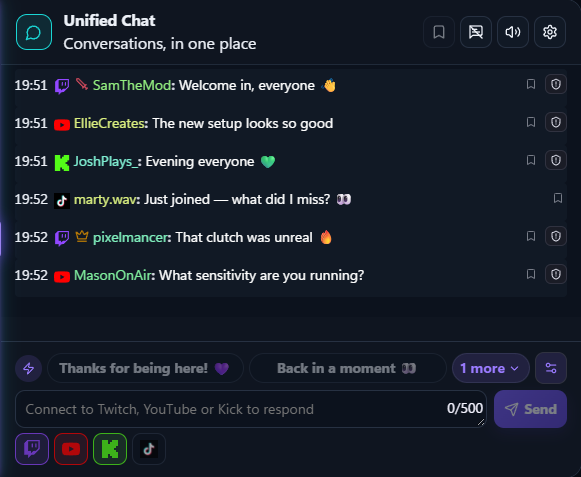
The real FeedNChat chat, with conversations from four platforms. English interface with demo data.
Product screenshot · demo data
Open full-size screenshot

Used by creators and agencies worldwide.

Creators
10,000+
Agencies
2,000+
TwitchYouTubeKickTikTok

Official Twitch, YouTube and Kick integrations. TikTok LIVE monitoring is read-only.

All your chat.
One conversation.

Bring Twitch, YouTube and Kick messages into one control room. Follow the conversation without bouncing between windows.

Explore multistream chat

Unified chat

A shared view of your connected channels.
Focus Inbox

Pin messages to return to between rounds.

Moderation

Review incidents and take the actions your role and platform support.

Build the show.
Make it yours.

Broadcast Studio gives your audience a complete scene or the individual modules your OBS setup needs. HUD Studio keeps your own chat and activity over the game.
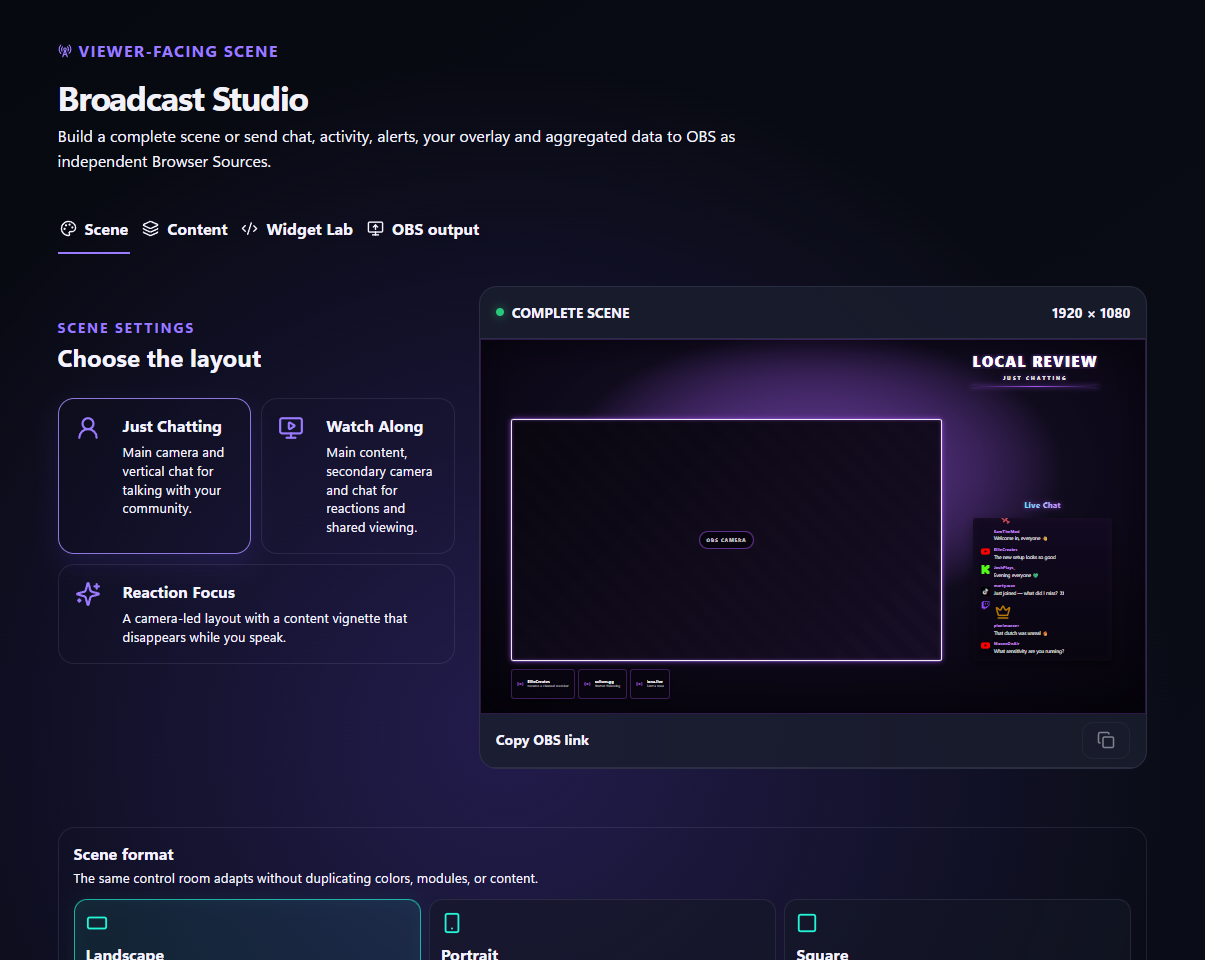
  • One show, three formats. Just Chatting, Watch Along and Reaction Focus, in landscape, portrait or square.
  • Your visual identity. A Brand Kit, draggable modules, HD or 2K output and Widget Lab for custom HTML, CSS and JavaScript.
  • Keep your view clear. A click-through HUD, independent module settings, Feed FX and platform-specific alerts.
Explore the Desktop HUD
FeedNChat: Broadcast Studio scene editor · demo content English interface with demo content.
Broadcast Studio scene editor · demo contentOpen full-size screenshot

Your voice.
English subtitles.

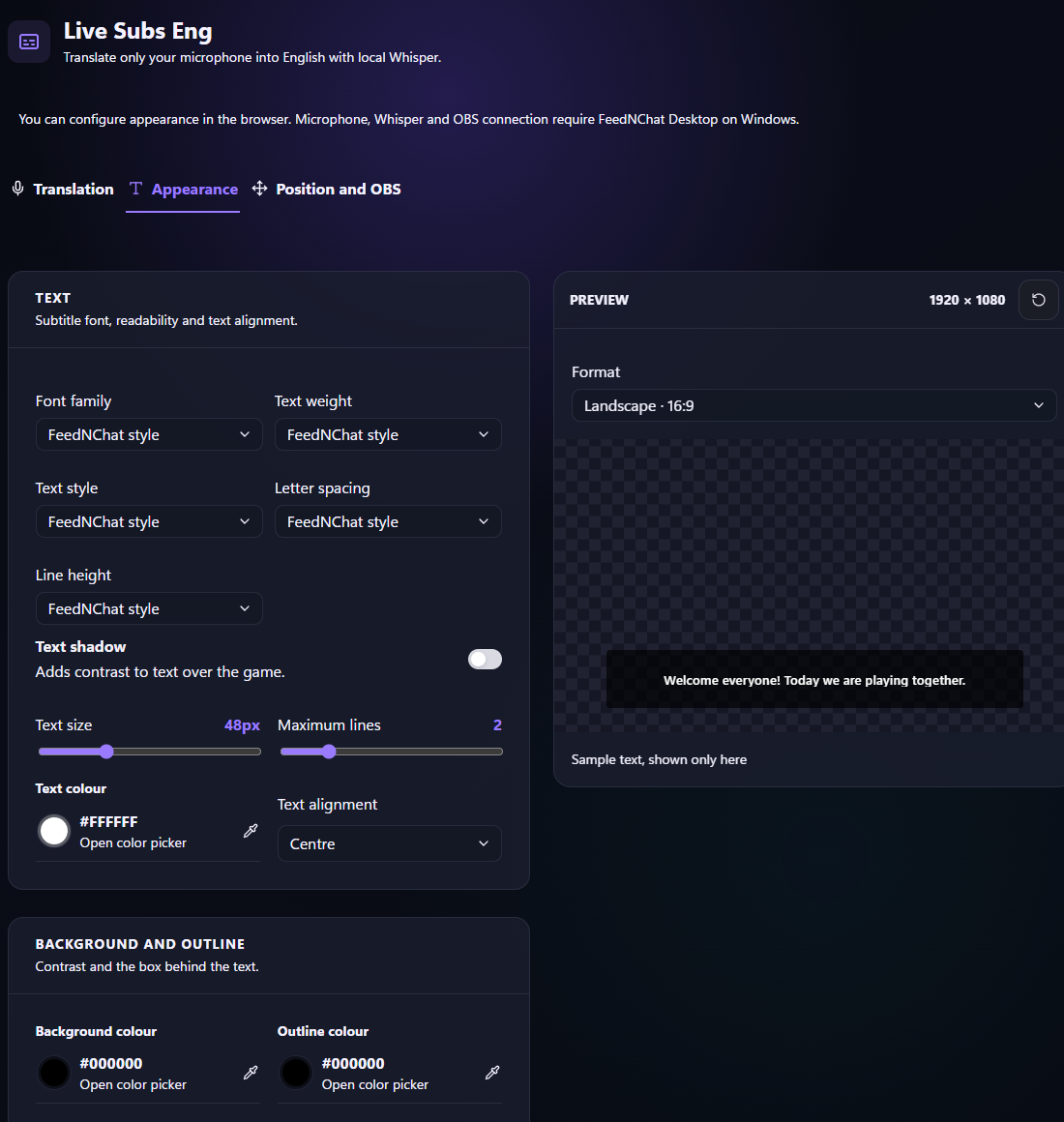
Live Subs Eng translates your microphone into English using local Whisper. Keep speaking in your language while English subtitles appear in your OBS output.
  • Local translation. After downloading the 148 MB model, translation works without an Internet connection. No audio or subtitle text is saved.
  • A style for your stream. Set typography, contrast and placement, with separate landscape and portrait layouts.
  • Ready for real live use. Requires compatible Windows x64 hardware and an authenticated OBS microphone connection. Supported Windows and OBS mute states clear the output.
FeedNChat: Live Subs Eng appearance editor · sample text English interface with demo content.
Live Subs Eng appearance editor · sample textOpen full-size screenshot

The chat watches.
The community plays.

Let chat choose the next challenge. Run a weighted wheel, build a Marathon timer or turn TikTok LIVE likes into a Tap Race.
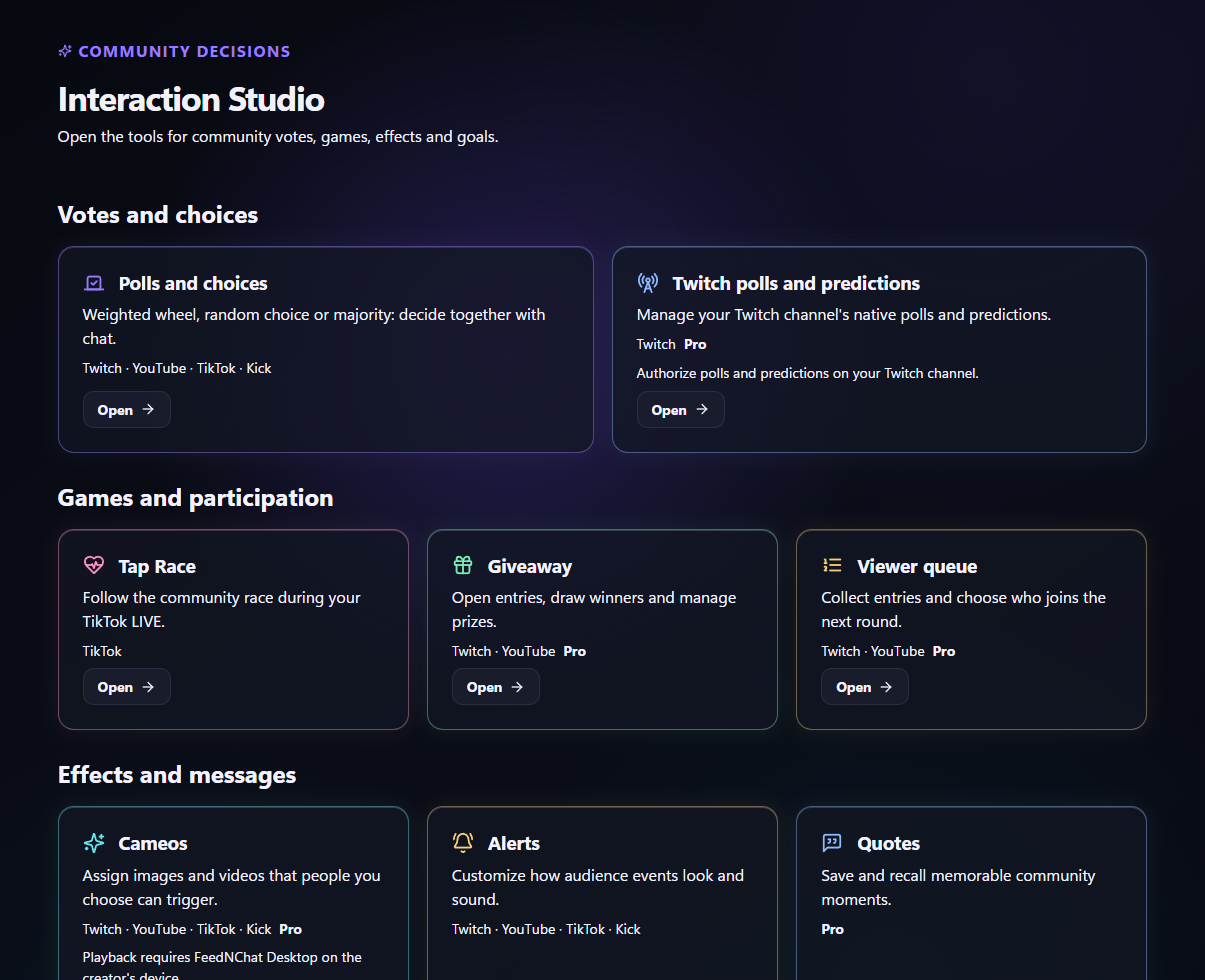
  • Start with Free. Polls and choices, Tap Race, Marathon and Goals are included alongside alerts.
  • Take it further with Pro. Giveaways, Cameos, Viewer queue, Quotes, Points and rewards, plus native Twitch polls and predictions.
  • Keep the rules clear. Every tool has its own platform requirements, permissions and live-state controls.
FeedNChat: Interaction Studio catalogue · Pro demo workspace English interface with demo content.
Interaction Studio catalogue · Pro demo workspaceOpen full-size screenshot

Know what connected.
Bring your team in.

Pro combines live analytics, Community Intelligence, Bot Studio and delegated control rooms. Review what happened and give moderators the tools they need for the next live.

Explore the creator workflow
  • Read the results. Compare periods and broadcasts with their actual platform coverage, then prepare aggregate reports.
  • Recognise participation. Understand returning viewers and community activity from the data FeedNChat observed.
  • Share the work. Invite up to ten moderators. Grant read or management access by section while your creator Desktop remains online.
  • Automate and listen. Commands, timers, multilingual moderation and filtered text-to-speech with system voices or Kokoro.

Find your next
live tool.

Explore the current creator toolkit. Free & Pro means included in both plans; platform support and Desktop requirements still apply.

Your live control room

Unified chatFree & Pro
Twitch, YouTube and Kick conversations together, with platform identity, emotes and supported sending. TikTok LIVE remains read-only.
Activity FeedFree & Pro
Follow subscriptions, follows, gifts and other supported events. Filter the feed without mixing unrelated currencies or units.
Focus InboxFree & Pro
Pin messages to return to between rounds. Keep priority conversations close without losing the main chat.
ModerationFree & Pro
Review incidents and use supported message actions. Permissions and provider capabilities determine what you can do.
Floating Chat and FeedFree & Pro
Move two independent Desktop windows across your monitors while they stay in sync with the Control Room.
Live modes and profilesFree & Pro
Switch between Gameplay, Just Chatting, Sponsor, Marathon, Collaboration, BRB, Ending and Safety. Restore your previous setup.
Setup CenterFree & Pro
Review account, platform and Desktop setup. Saved profiles keep recurring live formats ready to use.

What you see. What viewers see.

HUD StudioFree & Pro
Arrange chat, activity, goals and other modules on a transparent, click-through Desktop HUD. Use windowed or borderless fullscreen games.
HUD module composerFree & Pro
Drag, resize, layer and lock modules. Set individual typography, opacity, colours and visibility timing.
Monitor and capture controlsFree & Pro
Choose the HUD display and optional Windows capture protection. Hardware capture and external cameras remain outside that protection.
Feed FX StudioFree & Pro
Give supported events their own icon effects, intensity and timing in the Control Room or HUD.
Alert StudioFree & Pro
Build platform-specific visual and audio alerts with thresholds, local media, animation and conditional variations.
Alert DirectorFree & Pro
Prioritise the alert queue, group bursts, replay supported alerts and pause or mute output when the live needs space.
Broadcast StudioFree & Pro
Create Just Chatting, Watch Along and Reaction Focus scenes. Landscape, portrait and square layouts retain their own arrangements.
Brand KitFree & Pro
Set your scene logo, typography, colours, frames and neon intensity. Choose HD or 2K output.
Widget LabFree & Pro
Build a custom scene widget with HTML, CSS and JavaScript inside the built-in sandboxed editor.
Modular OBS sourcesFree & Pro
Use the complete scene or independent chat, activity, alerts and permitted interaction sources. FeedNChat Desktop must remain open.
Live-data modulesFree & Pro
Add Viewer Pulse, top supporters, a pinned message, lower thirds or CTA and QR modules. Each keeps its own metric context.
Microphone captionsFree & Pro
Show supported microphone captions with independent placement and appearance. Start capture explicitly in the Desktop app.
Live Subs EngFree & Pro
Translate microphone speech into English locally with Whisper. A compatible Windows x64 CPU, model download and authenticated OBS connection are required.

Let the community take part

Polls and choicesFree & Pro
Choose majority voting, a random choice or a weighted wheel across connected chats. The reveal uses the saved result.
Tap RaceFree & Pro
Turn observed TikTok LIVE likes into a community race. TikTok connection and live activity are required.
MarathonFree & Pro
Run an event-driven timer with configurable rules, pause, cap and multiplier. Prepare Community Marathon, Subathon or Charity formats.
GoalsFree & Pro
Set points or currency goals, event rules, an initial value and optional progress across lives. Contributions count during a live.
Twitch polls and predictionsPro
Manage native Twitch votes and Channel Points predictions with the channel authorisation they require.
GiveawaysPro
Configure eligible entries, draws and winner handling. Platform rules and available participation data still apply.
Viewer queuePro
Collect Twitch and YouTube entries, pause the queue and choose the next participant in order or at random.
CameosPro
Assign local images, GIFs or videos to selected chat identities. Commands, cooldowns and usage limits control playback on Desktop.
QuotesPro
Save selected community messages and recall a quote by number or at random, with permissions and cooldowns.
Points and rewardsPro
Manage supported loyalty points, reward costs, redemptions and fulfilment. Provider-specific eligibility remains visible.

Understand the live. Share the workload.

AnalyticsPro
Review observed live results, period trends and platform coverage. Missing information stays distinct from a measured zero.
ComparisonsPro
Compare periods or two broadcasts using compatible metrics, duration and coverage.
ReportsPro
Request aggregate exports for your selected scope. Track processing and download the completed report.
Community IntelligencePro
Explore participation and returning viewers in the activity FeedNChat observed. Individual workflows depend on the creator Desktop.
Bot StudioPro
Create commands, scheduled messages and automated moderation. Review multilingual rules, cooldowns and execution activity.
Chat RelayPro
Relay supported Twitch messages to YouTube with batching and anti-loop protection. It is a one-way relay.
Text-to-speechPro
Read filtered chat, subscriptions and supported alerts aloud. Choose system voices or Kokoro, speech speed and queue controls.
Team and shared control roomsPro
Invite up to ten moderators with section permissions. Your Desktop stays online; invited moderators do not need their own Pro plan.
Branding removalPro
Remove FeedNChat branding from the live outputs covered by your Pro plan.

Start free.
Grow with Pro.

A complete live foundation from day one.
Pro adds insight, automation and collaboration.

FeedNChat Free

€0 forever

Your Free account has no time limit or card requirement.

  • Control room, chat, feed & moderation
  • HUD, alerts & Broadcast Studio
  • Polls, Tap Race, Marathon & Goals
  • Live Subs Eng on compatible Desktop
Download free

FeedNChat Pro

€9.99 per month

Advanced tools on your real data, with FeedNChat branding removed from covered live outputs.

  • Analytics, reports & Community Intelligence
  • Bot, Team & text-to-speech
  • Giveaways, Cameos & Pro interactions
  • Up to ten invited moderators
Get FeedNChat
Compare FeedNChat Free and Pro
FeatureFreePro
Control room, chat, feed and moderationIncludedIncluded
HUD, Alert Studio and Broadcast StudioIncluded with brandingIncluded without branding
Live Subs EngIncluded on compatible DesktopIncluded on compatible Desktop
Polls, Tap Race, Marathon and GoalsIncludedIncluded
Giveaways, Cameos and other Pro interactionsUnavailableIncluded
Analytics, comparisons and reportsDemo previewYour observed data
Community IntelligenceDemo previewYour observed community
Bot Studio and TeamDemo previewActive tools and shared control rooms
Text-to-speechLocked controlsChat, subscription and alert speech

Free advanced previews use generated demo data and cannot change your workspace. Upgrade through PayPal inside FeedNChat. Cancelling monthly renewal keeps Pro until the end of the paid period. Existing lifetime purchases and confirmed Creator Early Access grants remain permanent. Agency packages are arranged separately.

A few things worth knowing.

Which platforms can I connect?

Twitch, YouTube and Kick use official integrations. TikTok LIVE monitoring is public and read-only; it does not offer chat sending or moderation. Every interaction tool has its own supported platforms.

Is Free a trial?

No. FeedNChat Free has no time limit or card requirement. It includes the live control room, HUD, alerts, Broadcast Studio and selected interactions. Create your account, verify your email and complete two-factor authentication.

How does the Pro trial work?

Eligible accounts can activate a one-time 7-day Pro trial through PayPal inside the app. No payment is taken at activation. Unless you cancel renewal first, PayPal charges €9.99 at the end of the trial and monthly afterwards. Accounts that previously had paid, lifetime or Partner/Agency Pro are not eligible.

What happens when I cancel Pro?

Cancelling renewal keeps Pro active until the end of your trial or paid period, then the account returns to Free unless another valid Pro entitlement applies. Existing lifetime purchases and confirmed Creator Early Access grants remain permanent.

What does Live Subs Eng require?

FeedNChat Desktop on compatible Windows x64 hardware with AVX2, FMA, F16C and BMI2 CPU support, a 148 MB model download and an authenticated local OBS connection to the same explicit microphone device. Translation is into English. Hardware and CPU load affect delay.

Can moderators help without buying Pro?

Yes. A Pro creator can invite up to ten moderators with section permissions. The creator Desktop must remain online. Invited moderators do not need their own Pro plan to use the authorised shared control room.

Does the HUD work over every game?

Use windowed or borderless fullscreen games. The click-through Desktop HUD does not support exclusive fullscreen. Broadcast Studio outputs are separate from the private in-game HUD.

Does FeedNChat restream my video?

No. FeedNChat brings live conversations and workflow tools together. Broadcast Studio supplies viewer-facing scenes and modules to your streaming software; it does not encode or restream video.

Your next live
starts here.

Bring your live world together with FeedNChat.

Download free